

Everything Just R can do
Just R is a flashcard app for iPhone and iPad built around spaced repetition. Here is every feature, what is free and what is part of Premium.
Categories and decks
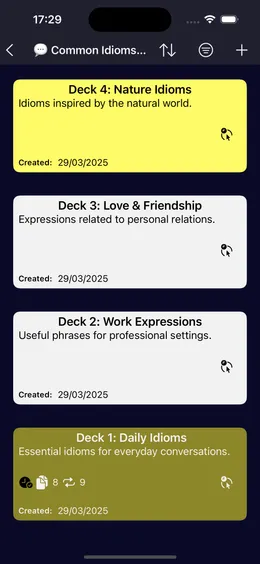
Organize what you learn the way you think about it: a category for each topic (travel, work, idioms, an exam), and decks inside it. Give every deck a color and a short description so you can spot it in a long list.
When you know a deck by heart, mark it as finished. It stays in your collection, out of your way.
How to make vocabulary flashcards that work
- Categories and decks with colors and descriptions
- Mark a deck as finished
- Sort and search decks; swipe to delete
Five kinds of cards
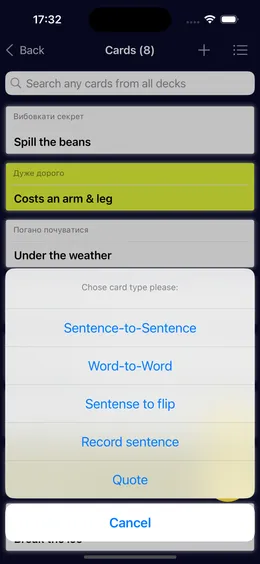
Not every word is learned the same way, so Just R has five card types. Choose one each time you add a card.
Every card can carry a note, a tag and a color. A note is the right place for an example sentence or a grammar hint.
- Word to word: a word and its translation
- Sentence to sentence: a whole phrase and its translation
- Sentence to flip: a phrase to recall from its translation
- Record sentence: say a phrase and it is typed in for you
- Quote: a line worth remembering
Swipe study: Remember or Forgot
Open a deck and go through it card by card. Flip a card to check yourself, then mark it Remember or Forgot. Trying to recall the answer before you flip is what makes the word stick.
Choose the card style you like for flip mode. Just R counts how many times you repeated each deck, today and in total.
- Flip cards with Remember and Forgot
- Card styles for flip mode
- Repetitions counted per day and in total
Reminders on the forgetting curve
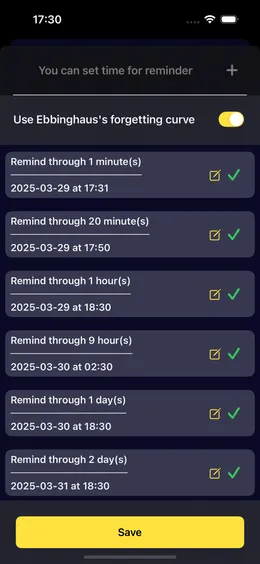
Switch on Use Ebbinghaus's forgetting curve for a deck and Just R schedules reviews at growing intervals: 1 minute, 20 minutes, 1 hour, 9 hours, 1 day, 2 days, 6 days, 1 month and 3 months after you start.
Each reminder arrives as a notification or as an event in your Calendar, whichever you pick. Prefer your own rhythm? Add reminders at the times you choose. Long-press a deck to see every date you repeated it.
Spaced repetition and the forgetting curve, explained
- Nine reminders on the forgetting curve, or your own times
- Local notification or Calendar event
- History of every repetition date
Speaking cards and dictation
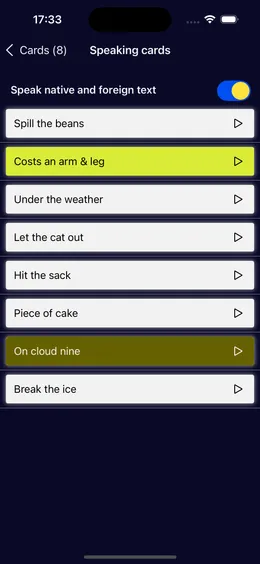
Hear a deck instead of reading it. Speaking cards read the native and the foreign side aloud, so you can review while walking or cooking. Set the voice, speed and pitch of the player in Settings.
With the Record sentence card type you hold the record button, say the phrase and release it: iOS speech recognition writes what you said into the card. If it typed something else, your pronunciation needs another try.
- Read aloud in both languages
- Voice, speed and pitch settings
- Dictate cards with speech recognition
Tags, colors and search
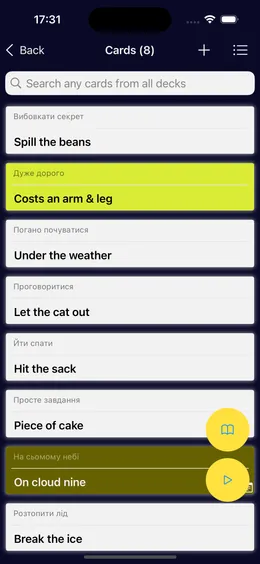
Tags cut across decks: tag every irregular verb or every word from one lesson, and study them together. Search finds any card in any deck, and lists can be sorted and filtered.
- Tags that combine cards from different decks
- Search across all decks
- Sort and filter decks and cards
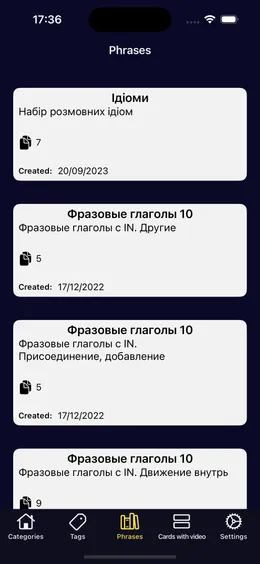
Ready-made decks Premium
The Phrases tab has decks that are ready to study: idioms, phrasal verbs, everyday expressions. Save one to your collection and it works like a deck you made yourself, reminders included.
Cards with video show phrases in use, so you hear the rhythm and see the context. Ready-made decks and video decks are part of Premium; single decks can also be bought one at a time.
- Save to your collection and listen to every card
- Decks with video
- Single deck purchase, or all with Premium
AI images for your cards
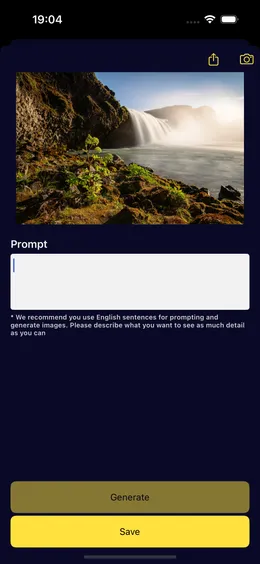
A picture is easier to recall than a word on its own. Describe a scene and Just R generates an image for the card, then save it.
AI features are optional and ask for your permission before first use. Only the text you write for the card is sent to OpenAI to create the image.
- Generate an image from a short description
- Optional, with a permission prompt
- Available as an in-app purchase
AI voice and word context Premium
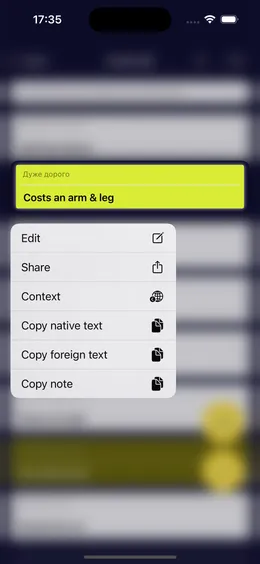
Have a card read aloud by a natural AI voice instead of the built-in system voice. And when a word could mean several things, ask for its context: real sentences that show how the word or phrase is used.
Both are part of Premium and, like every AI feature, only run after you allow them.
- Natural AI voice for any card
- Context of words and phrases
Home Screen widgets
A widget keeps your vocabulary in sight between reviews. Show a random card from your decks in a medium or large widget, styled the way you like, or a random quote.
- Random card widget, medium or large
- Random quote widget
CSV import and export
Already have a word list in a spreadsheet? Import it from a CSV file instead of typing every card again. Export your data to CSV whenever you want a copy, and share any single card.
- Import cards from CSV
- Export your data to CSV
- Share a card
Offline, with sync across devices
Just R works without a connection, so you can study on a plane or underground. Sign in with Apple, email or phone to sync your decks and keep them when you change phones.
Just R runs on iPhone and iPad with iOS 16 or later, on Macs with Apple silicon and on Apple Vision Pro. The app itself is in English, Ukrainian, Russian, German and Spanish, and you can make cards in any language.
- Offline mode
- Sign in with Apple, email or phone
- Delete your account in Settings at any time